Farm Frenzy 4 Full Version Free Download

The Farm Frenzy series of casual sims gets a makeover in this ALL NEW sequel. Choose and dress your character, and then get busy saving the family farm! Virtual farming has never been more fun, so grab yer overalls, roll up yer sleeves and get ready for an egg-crackin', cow-milking, sheep-shearin' good time!


As you enjoy vibrant 3D graphics–a first in a Farm Frenzy game!–each click of your mouse will fill a meter that, once full, will award you the money you need to complete your tasks. You can also look for hidden items to fill your meter faster! What's more, with each trophy you win, you'll earn items you can trade for temporary boosts. But the best new feature: love is in the air! Just introduce the chicken to the pig and see what happens!


Save grandpa and grandma's farm from foreclosure in the wacky and wonderful Farm Frenzy 4! Virtual farming has never been more fun, so grab yer overalls, roll up yer sleeves and get ready for an egg-crackin', cow-milking, sheep-shearin' good time!
- 90 levels and 4 worlds
- 3D graphics
- Learn-as-you-play tutorial

Game System Requirements:
OS: Windows XP/Windows Vista/Windows 7/Windows 8
CPU: 2.0 GHz
RAM: 1024 MB
DirectX: 9.0
Hard Drive: 899 MB

Download Farm Frenzy 4 Full Version Free Download here :


Mirror :

Read more...

Ubuntu server: melihat name dan data dns yang sudah dicache oleh BIND9

Seperti yang kita ketahui, BIND9 hanya menyimpan data dan name2 dns yang sudah dicache ke memory. Jd secara langsung kita tidak dapat melihat berapa data dns yang sudah dicache. Kelemahan caching dns menggunaan BIND9 adalah penyimpanan cachenya di memory, sehingga apabila server dimatikan atau direstart maka cache akan hilang. Hal ini wajar karena BIND9 fungsi utamanya diperuntukkan untuk DNS server, bukan sekedar DNS resolving dan caching. Untuk itu, bagi kita sebagai teknisi warnet harus menghindari segala kemungkinan untuk mematikan atau merestart server. Ok, back to topic, di bawah ini perintah untuk melihat data name DNS yang telah dicaching oleh BIND9.


Karena cache BIND9 letaknya di memory, maka pertama-tama kita dump dulu dari memory ke bentuk file, dengan perintah:

sudo rndc -dumpdb cache


maka akan terbuat sebuah file dengan nama named_dump.db di directory /var/cache/bind. Setelah itu, kita bisa melihat isi filenya dengan cat ataupun less.

lif2k3
~sparta.net~
Read more...

Ubuntu server: allow-query; menerima permintaan query dari ip address tertentu.

Dah sekian lama ga pernah update blog lg.. fyuh.. ok ah buat isi2 aja tak copas dikit aja dari notes FB warnetku.. :D. Udah pada tau BIND kan, sekarang yang terakhir BIND9. Yup, BIND merupakan DNS server.. hmm.. di dunia kita (perwarnetan maksudnya :p), BIND dipakai sebagai DNS caching and resolver. Fungsinya untuk menampung record2 DNS sehingga bisa dipakai kembali ketika menerima request query DNS dari klien. Sangat bermanfaat dimana request ke situs menjadi lebih cepat, sehingga browser "luwih kepenak".. hehehe..


Ok anggap aja BIND9 di Ubuntu server.. what? belum terinstall..? Lha caranya pake ini sih:

#apt-get install bind9 dnsutils

bind9 itu aplikasi BIND9 nya
dnsutils itu tools yang bermanfaat buat test DNS

Lalu, forwardersnya udah dikonfigurasikan di /etc/bind/named.conf.options. Ya forwarders itu yang isinya berbagai IP DNS yang kita pakai.

contoh named.conf.options :

options {
directory "/var/cache/bind";
forwarders {
202.134.0.155;
8.8.4.4;

8.8.8.8;
};
auth-nxdomain no;
listen-on port 53;
query-source address * port 53;
listen-on-v6 { any; };
};

Nah, supaya BIND9 hanya menerima request dari IP2 tertentu, maka harus dibuat dulu "acl" nya di /etc/bind/named.conf.

contoh:
acl sparta {192.168.0.0/24; 127.0.0.1; 192.168.1.10;};

ket:
sparta itu hanya nama acl nya saja, bisa diganti sesuka hati


Setelah itu, perbolehkan acl sparta itu agar bisa merequest DNS, dengan cara menambahkan allow-query di dalam options nya:

options {
directory "/var/cache/bind";
forwarders {
202.134.0.155;
8.8.4.4;
8.8.8.8;
};

allow-query {sparta;};

auth-nxdomain no;
listen-on port 53;
query-source address * port 53;
listen-on-v6 { any; };
};

Jadi dengan konfigurasi seperti itu, range ip 192.168.0.0/24 dan ip 192.168.1.10 bisa request DNS ke server. Kalau ip2 tersebut ingin diblok, artinya server tidak mau menerima request DNS dari IP tersebut, tinggal ganti aja allow-query dengan blackhole.

Smoga bermanfaat :)
lif2k3 ~ sparta.net
Read more...

Mengubah setting ip proxy di Ubuntu Server

Lama banget ga pernah update blog, males juga sih hehehe... ok langsung aja: banyak kasus salah masukin alamat proxy sewaktu menginstall ubuntu server, kebanyakan karena salah tulis, seharusnya http://xxx.xxx.xxx.xxx:xxxx tp ditulis hanya ip address dan portnya saja. Dampak yg pertama biasanya ga bisa melakukan apt-get karena gagal melewati proxy server.


Don't worry, bisa kok diganti. Yoi, cobalah edit file /etc/bash.bashrc pke editor vi ato pico sama aja :D
trus tambah ini di akhir file:
export http_proxy=http://[ip address/domain]@[password]:[port]
export ftp_proxy=ftp://[ip address/domain]@[password]:[port]
klo ga ada password ga usah ditulis,
contohnya ada di gambar di bawah:


Habis diedit, save lalu run export http_proxy dan export ftp_proxy, ato bila perlu reboot ubuntu.
apt-get lancar kembali :D

Read more...

ACDSee Pro 3 Download

With the flexibility and control offered by ACDSee Pro 3, you can manage your images the way that works best for you. No need to adapt your workflow to fit the cookie-cutter cataloging imposed by other photo applications.
ACDSee Pro is built to help you save time in all the key steps of your workflow. Each of the four modes - Manage, View, Process, Online – groups the tools that you commonly use during that particular step of your workflow.


Experience ACDSee Pro 3 - the best value in photography software
* Quickly browse, organize, and find images on your computer
* Easily import photos from your camera, card reader, scanner and other devices
* View your images – from JPEG to RAW – in full size at unrivaled speeds
* Process images with dynamic, non-destructive adjustments and fine-tune at the pixel level
* Easily publish and and store images online.


Manage:
* Browse your collection instantly with ACDSee Pro 3. Unlike other photo applications, you don’t need to spend valuable time importing files that are already on your computer and connected devices. Simply open ACDSee Pro 3 to access your folders and files live, in real time.
* Organize files using custom categories, keywords, ratings, IPTC/EXIF/XMP metadata and more.
* Be productive right away with up front import, renaming and categorizing of your new image files from your camera and other devices.
* Quickly tag your images for further processing.
* Perform sophisticated searches to quickly find any photo, and save them for ongoing use.
* Manage over 100 different file types.


View:
* View all your images – from JPEG to RAW – with the fastest viewing technology on the market.
* Organize files as you review them - categorize, rate, and add metadata using the Properties pane.


Process:
* Experience the combined power of ACDSee Pro 3's
non-destructive image development technology and precise pixel-level editor in one seamless environment.
* Perfect the exposure, color, clarity and geometry of your photos in the Develop sub-mode
* Boost saturation without affecting skin tones with the new Vibrance slider
* Fine-tune select areas, repair pixels, and add creative effects and watermarks in the Edit sub-mode.
* Save time by globally adjusting hundreds of photos at once - including RAW files - with batch tools.


Online:
* Copy photos and folders to your free* online account with a simple drag and drop interface.
* Organize images online as easily as you do on your desktop, using a folder tree structure.
* Create password-protected albums to share with clients or public albums to showcase to the world.

Experience an accelerated workflow with ACDSee Pro 3 - developed, tested, and preferred by professional photographers around the world.


ACDSee Pro Homepage
Click this to download ACDSee Pro 3 Download
Read more...

Rencana Apple Memacu Si Kencang Mac Pro

Mac Pro merupakan jajaran produk Apple yang berplatform spesifikasi super tinggi. Bayangkan, dengan dua prosesor Nehalem dari Intel dan 32GB RAM, mampu mendongkrak kinerja grafis yang memukau. Tapi platform tersebut tidak seberapa jika dibandingkan dengan generasi penerus Mac Pro nanti. Ya, tahun depan kita akan melihat Mac Pro dengan 12 core prosesor dan 128GB RAM! wow.. bukan sekedar Big Mac, tapi benar-benar Mega Mac!


Website Mac melaporkan bahwa Apple akan mengeluarkan Mac Pro yang diperkuat Prosesor Gulftown pada awal 2010 nanti, beberapa bulan sebelum peluncuran chip tersebut ke publik. Untuk saat ini, Mac Pro menggunakan satu atau dua prosesor CPU Nehalem, 4-core Xeon 5500 dengan ram sampai 32GB.

Nehalem dibuat berdasar proses manufaktur 45nm. Proses tersebut merupakan proses peralihan Intel ke teknologi 32nm (Westmere), Gulftown merupakan prosesor Xeon yang memiliki 6 core, dan generasi prosesor desktop baru Intel i9 juga sama-sama dibuat dengan proses Westmere.

Dikabarkan platform yang memiliki fitur grafis terintegrasi, engine virtualisasi yang baru dan dukungan enkripsi ini akan diluncurkan setidaknya awal tahun depan. Dapat diprediksi bahwa beberapa produsen komputer server ataupun workstation akan meluncurkan produk Gulftown mereka pada kuartal kedua 2010 mendatang.

Gulftown 35nm Processor: Intel i9

Hmm.. kabar-kabarnya sih Apple akan meluncurkan platform itu lebih awal, diperkirakan kuartal pertama. Tidak tanggung-tanggung, Mac Pro nantinya akan berkekuatan satu atau dua Gulftown, artinya 12 atau 24 thread, kapasitas RAM sampai 128 GB dengan dukungan satu modul RAM sebesar 8 sampai 16GB, wow meningkat empat kali dari sebelumnya. Perlu diketahui, Mac Pro terbaru nantinya akan mendukung ethernet berkecepatan 10GB/s.
(cm/lif)

Read more...

Dasar Pemrograman Flash Game

Adobe flash atau sebelumnya Macromedia Flash merupakan software multifungsi. Terlepas dari fungsi awalnya, yaitu mempermudah pembuatan animasi web, ternyata flash berkembang pesat hingga dapat kita manfaatkan sebagai software multi media yang luar biasa. Bahkan Flash dengan action script-nya dapat dimanfaatkan menjadi program pembuat game yang mudah dan efektif.


Sebelum lebih lanjut mengenai pembuatan game flash, kita harus memahami terlebih dahulu bahwa membuat game flash itu menyenangkan dan menguntungkan. Bagi sebagian orang memainkan game sangat menyenangkan, konsep inilah yang harus kita pegang yaitu kita berusaha untuk menyenangkan orang lain melalui sebuah game. Semakin orang lain menikmati permainan game buatan kita, disitulah letak keberhasilan kita sebagai seorang pembuat game. Pemrograman komputer pada umumnya akan sulit dipahami oleh seseorang yang awam terhadap sebuah bahasa pemrograman. Disisi lain membuat game merupakan salah satu penerapan dari ilmu pemrograman komputer. Namun kita tidak perlu berkecil hati, karena flash dan action scriptnya sangat mudah untuk dipelajari dan melalui buku ini kita bisa mendapatkan pengetahuan tentang membuat game dengan flash.


Klik di sini untuk download
Pass : lif2k3

Credit to Wandah W

Read more...

Speeding Up Mozilla Firefox

Here’s a configuration tip that enables Firefox to download Web pages faster: enable HTTP pipelining. HTTP pipelining allows Firefox to send multiple requests at the same time, resulting in faster loading times for Web content.


Warning
HTTP pipelining is an experimental feature and can cause some Web pages to display incorrectly if they’re not properly supported by the Web servers. While the speed improvements may be worthwhile, if your favorite Web pages start to look weird, try turning pipelining off again.
To enable pipelining, open the about:config interface:

Then:
  • Set the network.http.pipelining preference to “true” to enable HTTP pipelining for Web access that’s “direct connect.”
  • Set the network.http.proxy.pipelining preference to “true” to enable HTTP pipelining when the Web is accessed via a proxy server. You only need to do this if you’re using a proxy server; your ISP or network administrator can tell you if that’s the case or not.
  • Set the network.http.pipelining.maxrequests preference to a number between 1 and 8. This number is the maximum number of requests that Firefox may send out at any one time in a pipeline. I recommend it be set to the maximum of 8 initially, then test working backwards from there. Step the value down by one (first to 7, then to 6, and so on) each time you notice the page display having problems.

With this hidden preference, you have to restart Firefox entirely before you can determine if a speed boost has been gained.
Read more...

Minitar MWGUHA Driver Download for Windows Vista

Minitar MWGUHA

Features: High Gain 5dBi Deattachable Antenna, support WMMTM (WI-FI Multimedia) Qos function, 64/128/256-bit WEP and WPA/WAP2 data encryption security, support Windows 98SE,Me,2000,XP,XP x64,MAC and Linux, suitable for notebook or desktop PC, support USB 2.0/1.1 interface, support Software AP Bridge function, Support NDS and PSP X-Link and support Roaming function.


Specifications


Click this to Download Minitar MWGUHA Driver for Windows Vista (including Windows 98,ME,2000), Linux and Mac.
Read more...

TP-Link TL-WN322G driver download for Windows Vista/XP/2K/ME/98

The TP-LINK TL-WN322G Wireless USB Adapter gives you the flexibility to install the PC or notebook PC in the most convenient location available, without the cost of running network cables.

Its auto-sensing capability allows high packet transfer up to 54Mbps for maximum throughput, or dynamic range shifting to lower speeds due to distance or operating limitations in an environment with a lot of electromagnetic interference. It can also interoperate with all the 11Mbps wireless (802.11b) products. Your wireless communications are protected by up to 256-bit encryption, so your data stays secure.

Additionally, TL-WN322G supports Soft AP, which supports PSP connection, brings you joyful Online-gaming experience.

TP-Link TL-WN322G is a USB Wireless kit uses for desktop or notebook PC. Supports both 802.11b and 802.11g, 54/48/36/24/18/12/9/6/11/5.5/2/1Mbps wireless LAN data transfer rate, Ad-hoc and Infrastructure modes, and supports roaming between access points.

Click this to download TP-Link TL-WN322G Driver for Windows Vista / XP / 2000 / Me / 98

Read more...

Wireless Basic: Network Architecture

The architecture of a network defines the protocols and components necessary to satisfy application requirements. One popular standard for illustrating the architecture is the seven-layer Open System Interconnect (OSI) Reference Model, developed by the International Standards Organization (ISO). OSI specifies a complete set of network functions, grouped into layers, which reside within each network component. The OSI Reference Model is also a handy model for representing the various standards and interoperability of a wireless network.


The OSI layers provide the following network functionality:
  • Layer 7—Application layer: Establishes communications among users and provides basic communications services such as file transfer and e-mail. Examples of software that runs at this layer include Simple Mail Transfer Protocol (SMTP), HyperText Transfer Protocol (HTTP) and File Transfer Protocol (FTP).
  • Layer 6—Presentation layer: Negotiates data transfer syntax for the application layer and performs translations between different data formats, if necessary. For example, this layer can translate the coding that represents the data when communicating with a remote system made by a different vendor.
  • Layer 5—Session layer: Establishes, manages, and terminates sessions between applications. Wireless middleware and access controllers provide this form of connectivity over wireless networks. If the wireless network encounters interference, the session layer functions will suspend communications until the interference goes away.
  • Layer 4—Transport layer: Provides mechanisms for the establishment, maintenance, and orderly termination of virtual circuits, while shielding the higher layers from the network implementation details. In general, these circuits are connections made between network applications from one end of the communications circuit to another (such as between the web browser on a laptop to a web page on a server). Protocols such as Transmission Control Protocol (TCP) operate at this layer.
  • Layer 3—Network layer: Provides the routing of packets though a network from source to destination. This routing ensures that data packets are sent in a direction that leads to a particular destination. Protocols such as Internet Protocol (IP) operate at this layer.
  • Layer 2—Data link layer: Ensures medium access, as well as synchronization and error control between two entities. With wireless networks, this often involves coordination of access to the common air medium and recovery from errors that might occur in the data as it propagates from source to destination. Most wireless network types have a common method of performing data link layer functions independent of the actual means of transmission.
  • Layer 1—Physical layer: Provides the actual transmission of information through the medium. Physical layers include radio waves and infrared light.

The combined layers of a network architecture define the functionality of a wireless network, but wireless networks directly implement only the lower layers of the model. A wireless NIC, for example, implements the data link layer and physical layer functions. Other elements of the network (such as wireless middleware), however, offer functions that the session layer implements. In some cases, the addition of a wireless network might impact only the lower layers, but attention to higher layers is necessary to ensure that applications operate effectively in the presence of wireless network impairments.

Each layer of the OSI model supports the layers above it. In fact, the lower layers often appear transparent to the layers above. For example, TCP operating at the transport layer establishes connections with applications at a distant host computer, without awareness that lower layers are taking care of synchronization and signaling.

As shown in figure above, protocols at each layer communicate across the network to the respective peer layer. The actual transmission of data, however, occurs at the physical layer. As a result, the architecture allows for a layering process where a particular layer embeds its protocol information into frames that are placed within frames at lower layers. The frame that is sent by the physical layer actually contains frames from all higher layers. At the destination, each layer passes applicable frames to higher layers to facilitate the protocol between peer layers.


*) Jim Geier
Read more...

About Cache

Cache is a special area of memory, managed by a cache controller, that improves performance by storing the contents of frequently accessed memory locations and their addresses. A memory cache and a disk cache are not the same. A memory cache is implemented in hardware and speeds up access to memory. A disk cache is software that improves hard-disk performance. When the processor references a memory address, the cache checks to see if it holds that address. If it does, the information is passed directly to the processor, so RAM access is not necessary. A cache can speed up operations in a computer whose RAM access is slow compared with its processor speed, because cache memory is always faster than normal RAM.

There are several types of caches:
Direct-mapped cache: A location in the cache corresponds to several specific locations in memory, so when the processor calls for certain data, the cache can locate it quickly. However, since several blocks in RAM correspond to that same location in the cache, the cache may spend its time refreshing itself and calling main memory.
Fully associative cache: Information from RAM may be placed in any free blocks in the cache so that the most recently accessed data is usually present; however, the search to find that information may be slow because the cache has to index the data in order to find it.
Set-associative cache: Information from RAM is kept in sets, and these sets may have multiple locations, each holding a block of data; each block may be in any of the sets, but it will only be in one location within that set. Search time is shortened, and frequently used data are less likely to be overwritten. A set-associative cache may use two, four, or eight sets.


Disk Cache

An area of computer memory where data is temporarily stored on its way to or from a disk. When an application asks for information from the hard disk, the cache program first checks to see if that data is already in the cache memory. If it is, the disk cache program loads the information from the cache memory rather than from the hard disk. If the information is not in memory, the cache program reads the data from the disk, copies it into the cache memory for future reference, and then passes the data to the requesting application. This process is shown in the accompanying illustration. A disk cache program can significantly speed most disk operations. Some network operating systems also cache other often accessed and important information, such as directories and the file allocation table (FAT).
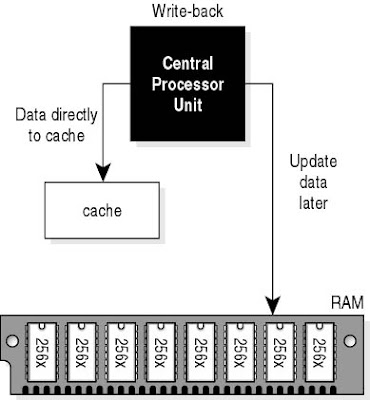

Write-back Cache
A technique used in cache design for writing information back into main memory. In a write-back cache, the cache stores the changed block of data, but only updates main memory under certain conditions, such as when the whole block must be overwritten because a newer block must be loaded into the cache or when the controlling algorithm determines that too much time has elapsed since the last update. This method is rather complex to implement, but is much faster than other designs.


Write-through Cache
A technique used in cache design for writing information back into main memory. In a write-through cache, each time the processor returns a changed bit of data to the cache, the cache updates that information in both the cache and in main memory. This method is simple to implement, but is not as fast as other designs; delays can be introduced when the processor must wait to complete write operations to slower main memory.


Why is the Cache Important?


The main reason cache is important is that it increases the real speed of a processor by providing the processor with data more quickly. A processor can only crank through data if it is being given data, and any delay that exists between when the processor requests data and when the processor receives it means that clock cycles are being left idle which could have otherwise been used.

That said, summing up the importance of cache in a general way is difficult to do. Cache performance has traditionally been ignored because until very recently it did not have a major impact. The cache for most Pentium 4 series processors, for example, was only 256 or 512 kilobytes, depending on the processor. Having some cache was useful, but it did not have major impact on application performance because there was not enough cache for applications to make use of. For example, the original Celeron had no cache integrated into the processor, but it still performed extremely well in games compared to processors which did include cache. This was partly because cache sizes were not large enough to hold more than extremely common and general sets of data and partly because games generally don't make much use of CPU cache because there the amount of frequently used data far exceeds what is available.

However, cache has become more important in modern processors thanks to better implementations and an increase in cache size. This increase in the important of cache is probably due to the problems that became evident in Intel's Pentium 4 line-up. The Pentium 4 processors relied heavily on high clock speeds, and as a result they were power-hungry and ran hot. Intel learned from this when it created the Core 2 Duo series, which used lower clock speeds but made up for it with multiple cores and a much larger cache. These days, it is not unusual to find a processor with an L2 cache of 8MB. Cache has become important because it gives Intel and AMD a way to increase the performance of their processors. Cache goes hand-in-hand with the trend towards processors with multiple cores. Both the Phenom II and the Core i7 possess larger cache sizes then the Phenom and the Core 2 architectures, and the trend of increasing cache size is likely to continue.

Read more...

Download Acer 4535 Driver for Vista

The Aspire 4535 provides entertainment enjoyment with high-def visuals and pleasurable surround sound. True cinematic 16:9 aspect ratio and 1366 x 768 pixel resolution generate widescreen, HD enjoyment of today's best entertainment and 8 ms high-def response time delivers high-quality moving images.


BENEFITS

Cinematic fun
True cinematic 16:9 aspect ratio and 1366 x 768 pixel resolution generate widescreen, HD enjoyment of today's best entertainment.
Powerful performance
Advanced features deliver increased security, speedy multitasking and efficient performance.
Superior control
Revolutionary new features give you unprecedented control over your entertainment, work and life!


DRIVERS


Click here to download Realtek Audio Driver
Click here to download BTW Broadcom
Click here to download Bison Camera
Click here to download Suyin camera
Click here to download Realtek Cardreader Driver
Click here to download Nvidia Chipset Driver
Click here to download Fingerprint AS Authentec
Click here to download Broadcom Gigabit LAN Driver
Click here to download Launch Manager for Vista
Click here to download Foxconn Modem Driver
Click here to download Touchpad Synaptics Driver
Click here to download Nvidia VGA Driver
Click here to download Atheros BGN-77H053 Driver
Click here to download Foxconn WLAN T60H976 BG Driver
Click here to download Foxconn WLAN T77H030 BG Driver
Click here to download QMI WLAN Driver

Read more...

Download Acer Ferrari 1100 Drivers

The Ferrari 1100 takes ultra-portability into the fast lane. Driven by the revolutionary performance of dual-core processing power and wrapped in an exclusive, ultra-lightweight case, the Ferrari 1100 combines the unique style of race-bred innovation with the leading edge of mobile technology to bring your digital media to life wherever you are.


BENEFITS

Designed for ultra-performance
Beneath the carbon fibre casing of the Ferrari 1100 lays the latest AMD Turion 64 X2 dual-core mobile technology that not only sets the Ferrari 1100 apart from the competition for mobile performance and long-lasting battery life but also adds style, strength and lightweight flexibility to your mobile world. For an even greater mobile multimedia experience, the Ferrari 1100 also features an integrated slot-loading DVD SuperMulti DL and Dolby certified technology for cinema style surround sound capabilities.

Faster, sleeker, lighter, safer
The Ferrari 1100 takes mobile communication to entirely new levels, combining full wired and wireless Draft-n connectivity options with an Acer Crystal Eye video camera concealed at the top of the 12.1” WXGA display for real-time video conferencing on the move. With Acer DASP technology providing system shock protection along 3-axes and Acer Bio-Protection fingerprint solution for enhanced network and data security, the Ferrari 1100 is a faster, sleeker, lighter and safer way to take your digital world with you.

DRIVERS
Download Ferrari 1100 Drivers for Windows XP:
Click here to download ATI SM Bus
Click here to download ATI Radeon X1250 Mobility Driver
Click here to download AMD Processor Driver
Click here to download Realtek Audio Driver
Click here to download Atheros Wireless Driver
Click here to download Broadcom Wireless Driver
Click here to download Broadcom Gigabit LAN Driver
Click here to download Agere Modem Driver
Click here to download Conexant Modem Driver
Click here to download Bison Camera Driver
Click here to download Suyin Camera Driver
Click here to download Broadcom Bluetooth Driver
Click here to download Acer BioProtect Fingerprint Driver
Click here to download Realtek Cardreader Driver
Click here to download Launch Manager
Click here to download Touchpad Synaptic Driver

Download Ferrari 1100 Drivers for Windows Vista:
Click here to download ATI VGA Filter Driver
Click here to download ATI Radeon X1250 Mobility Driver
Click here to download Realtek Audio Driver
Click here to download Atheros Wireless Driver
Click here to download Broadcom Wireless Driver
Click here to download Broadcom Gigabit LAN Driver
Click here to download Agere Modem Driver
Click here to download Conexant Modem Driver
Click here to download Bison Camera Driver
Click here to download Suyin Camera Driver
Click here to download Broadcom Bluetooth Driver
Click here to download Finger Authentic Driver
Click here to download Realtek Cardreader Driver
Click here to download Launch Manager
Click here to download Touchpad Synaptic Driver
Click here to download AcerVCM

Read more...

The New Microsoft Office 2010

Microsoft Office 2010 (codename Office 14) is the next version of the Microsoft Office productivity suite for Microsoft Windows. It entered development during 2006 while Microsoft was finishing work on Microsoft Office 12, which was released as the 2007 Microsoft Office System.
It was previously thought that Office 2010 would ship in the first half of 2009, but Steve Ballmer has officially announced that Office 2010 will ship in 2010. The new version will implement the ISO compliant version of Office Open XML which was standardized as ISO 29500 in March 2008.

The software giant plans to offer a Web-based version of its Office productivity suite, known as Office Web that will debut with the release of Office 2010. Office Web will include online versions of Word, Excel, PowerPoint and OneNote. The next versions of Microsoft Office Visio, OneNote, Microsoft Office Project, and Publisher will feature the ribbon interface element used in other Office 2007 applications.

Builds
Earlier this year, on April 15, 2009, Microsoft confirmed that Office 2010 will be officially released in the first quarter of 2010. They also announced on May 12, 2009 at an event, that Office 2010 will begin technical testing during July. It will also be the first version of Office to ship in both 32-Bit and 64-bit versions.

New features
At present, the technical preview of Office 2010 would not be available as it will be starting from July onwards, but when Microsoft used it to show improved integration with Windows 7 at its event this week, various experts find out some of the new features of the new Office.


  • The ribbon surface was introduced in Office 2007 and it is here to stay, but now the Office 2010 ribbon gets the flatter Windows 7 look. Ribbon is a form of toolbar, combined with a tab bar.
  • In the new application, instead of the round Office icon, there is a button in each app that looks like the buttons for the different tabs on the ribbon, in the signature colour of that application (green for Excel, blue for Word, red for PowerPoint, yellow for Outlook and so on).
  • The app windows, which were removed in Office 2007, get their window menus back. The app let you restore, move, size, minimise, maximise or close the window.
  • Now with a right-click on the Outlook icon on the taskbar, user can create a new email message, appointment, contact or task, or open the inbox, calendar, contact or tasks window.
  • In the new office, you can drag a file from the jump-list of any application onto the navigation pane in Outlook to create a new mail message with the file as an attachment. Outlook can automatically ignore all the replies of the messages you are not interested in.
  • The company says user can create his own Quick Steps, making them sound like a combination of the Quick Access Toolbar and macros. For e.g., common tasks like filing a message, creating a meeting, marking a flagged message and deleting it at the same time. Also, user can create quick steps for things he do over and over again in Outlook.
  • In new Office outlook, voice mail can be converted to the text and sent as an email. Also, it can sync text messages from a Windows Mobile 6.1 phone into user’s inbox and reply to them.
  • When you reply all to messages you were BCC on, a warning is displayed on the desktop. Redmond based company claims that starting, searching and shutting down Outlook are all much faster and also promises that Outlook will run and search faster than the 2007 release.
  • At present, there is no news on the next version of Office for the Mac, but the next version of Outlook Web Access will run on Safari and Firefox with all features, rather than in a Lite version.
Read more...

What is Search Engine Optimization

When you are doing business online, one thing that you have to be very aware of is the importance of a search engine like Google or Yahoo. When you think about the fact that a very high number of purchases are made directly after the use of a search engine, you will soon see why making sure that you have the attention of search engine as well as having high ranking on the page is necessary.


Search engine optimization services will vary in what they do and how they do it, but their main goal is to make sure that your website gets the attention that they need. There are many different companies that will provide you with this valuable service, ranging from single freelancing individuals to full companies, but the important thing is that you find someone that you feel comfortable with. Dont be afraid to ask who they have worked with in the past and what industries they are most familiar with.

A search engine optimization company is one that will put a lot of time into researching your company and into thinking about the people who are looking for it. They will take a look and figure out how your prospective customers are trying to find you, and they will also think about ways to make it easier for them to do so. One tool that a company might use is keyword density; they will work with the text that you have on your site, and they will work with what words you use and how relevant you have made it in order to make your site more searchable. You will also find that they will work towards helping your site with things like link building, which will bring more people to your site from related areas as well as from the search engines themselves.

When you are looking for search engine optimization services, remember that you will want to use one that uses ethical means. For instance, you will find that one of the fastest ways to get traffic at your site is to deliberately post negative reviews and statements about other people or things. While this will bring you more traffic, it does not last and the people who come are not interested in your goods; at the end of the day, this is a very unethical way to bring people to your site! Take some time to figure out what techniques any search engine optimization service that you are considering will use.

Many people want their website to be more noticeable, but they are often unsure about how to go about it. There are, however, plenty of search engine optimization services out there that are willing to offer you their services, so ensure that you think about what is available, and how to make your website really shine!


Using Google for Search Engine Optimization


Google search engine optimization is a very complicated thing. Interestingly enough, Google gives you all the tools you need. Search engine optimization (SEO) is important as most of the traffic to an article or website will come from the search engines. The following are the steps you can take in order to make use of the tools provided by Google for Search Engine Optimization.

  1. Adwords is one of the most useful tools on the web for Google Search Engine Optimization. Adwords will allow you to pull an estimated average cost per click for a specific keyword in addition to providing traffic information to that keyword. This means that you can find out how much money an advertiser has to pay for an add click and how often the keyword is searched for so that you can target both traffic keywords and your ads at the same time. Keep in mind that you, as the publisher, will receive only a fraction of the estimated cost per click when someone clicks the ad.
  2. Google search is a great tool also. If a ton of people are already targeting your keyword, then there is a lot of work to be done if you want to get onto the front page. Many authors will abandon a keyword if it is not an open idea; however it is probably better to write and then optimize your site or article through other optimization methods. This will still give you an idea how much additional Google search engine optimization needs to be done.
  3. Google trends is a tool for identifying popularity of keywords for your website or articles. It allows you to search for and compare keywords so that you can pick the best ones. (Ex, Car vs. Automobile.) This Google search engine optimization tool is part of the Google Labs tool set which includes many other tools for web developers.
  4. Analytics is a great resource. It allows you to identify traffic trends to your website and articles. This is best used by someone who has their own website as you have to put a piece of code on the site to be able to pull data. Traffic trending is important because often you may be able to change keywords in order to localize ads, making them more pertinent to the local that is viewing them.

Read more...

Fundamental Frekuensi Jaringan Nirkabel

Jaringan nirkabel atau wireless network dapat dibagi menjadi dua segmen besar: jarak-pendek dan jarak-jauh. nirkabel jarak-pendek (short-range wireless networks) menyinggung beberapa jaringan yang memiliki luas terbatas. Beberapa diantaranya yaitu local area network (LAN) seperti gedung perusahaan, sekolah, kampus, rumah dan lain sebagainya, sama juga dengan personal area network atau PAN yaitu beberapa komputer portabel saling berhubungan dalam satu cakupan komunikasi. Tipikal jaringan-jaringan tersebut beroperasi dengan landasan spektrum tak berlisensi (unlincensed spectrum) yang hanya digunakan untuk keperluan industri, ilmiah dan medis atau ISM (Industrial, scientific, medical).


Frekuensi-frekuensi jaringan jarak-pendek yang tersedia berbeda antara satu negara dengan negara lain. Frekuensi yang paling umum digunakan adalah 2,4 GHz, frekuensi tersebut hampir digunakan di seluruh dunia. Ada juga frekuensi lain yang juga sering dipakai semisal 5 GHz dan 40 GHz. Ketersediaan frekuensi-frekuensi tersebut memungkin pengguna untuk mengoperasikan jaringan nirkabel tanpa harus mendaftarkan ke lisensi atau harus bayar.

Jaringan jarak-jauh (long-range wireless networks) melebihi cakupan LAN. Sisi konektivitas umumnya disediakan oleh beberapa perusahaan yang menjual konektivitas nirkabel sebagai sebuah jasa layanan mereka. Jaringan tersebut membentang luas semisal mencakup area kota, kabupaten, provinsi bahkan satu negara. Tujuan jaringan jarak-jauh tersebut adalah untuk menyediakan area cakupan (coverage) wireless secara global. Jaringan jarak-jauh yang umum dipake ialah Wireless Wide Area Network (WWAN). Saat cakupan global benar-benar dibutuhkan, komunikasi memakai jaringan satelit juga dimungkinkan.

Proses dalam menghantarkan jaringan nirkabel pada long-range wireless networks bernama modulasi (modulation). Ada beberapa teknik modulasi yang kesemuanya memiliki kelebihan dan kekurangan dalam hal efisiensi dan kebutuhan daya. Teknik-teknik modulasi tersebut antara lain:

1. Narrowband Technology (pita sempit)
Mengirim dan menerima data pada frekuensi radio yang spesifik. Frekuensi pita ditekankan sesempit mungkin namun memungkinkan data masih bisa dikirim. Interferensi dapat dicegah dengan mengkoordinasi user-user yang berbeda pada frekuensi-frekuensi yang berbeda-beda pula. Radio penerima menyaring semua sinyal kecuali sinyal yang dikirim melalui frekuensi yang disepakati. Penggunaan ini biasanya harus memiliki perizinan dari pemerintah setempat. Contohnya perusahaan yang memiliki cakupan usaha yang sangat luas.

2. Spread spectrum
Secara desainnya, spread spectrum mengobankan efisiensi bandwidth untuk reliabilitas, integritas dan sekuritas. Memakan banyak bandwidth dibanding narrow-band technology, namun memproduksi sinyal lebih tajam dan mudah dideteksi oleh penerima dimana mengetahui sinyal itu ketika sinyal dalam keadaan broadcast. Ada dua variasi radio spread-spectrum: Frequency-hopping spread spectrum (FHSS) dan Direct-sequence spread spectrum (DSSS).

3. Orthogonal Frequency Division Multiplexing (OFDM)
OFDM mengirim data dalam metode paralel, yang bertentangan dengan Hopping Technique yang digunakan oleh FHSS dan Spreading Technique yang digunakan oleh DSSS. Hal Ini melindungi data dari gangguan sewaktu sinyal sedang dikirim melalui frekuensi paralel. OFDM memiliki 'ultrahigh spectrum eficiency', yang berarti lebih banyak data yang dapat dikirim melalui jumlah bandwidth yang lebih kecil. Hal tersebut efektif untuk transmisi data yang tinggi. OFDM adalah bahwa lebih sulit untuk diterapkan daripada FHSS atau DSSS, dan memakan daya terbesar.
Read more...

Sekilas Tentang Enkripsi File

Encrypting File System (EFS) atau sistem pengekripsian file bisa dikatakan suatu fenomena dimana user dapat mengenkrepsi (dalam hal ini berkaitan dengan perlindungan data) file dan folder bahkan semua data di drive yang diformat NTFS. Sangat cocok untuk mengamankan data-data yang dianggap sensitif dalam hal keamanan terutama untuk komputer-komputer portabel. Dan juga sangat baik untuk mengamankan data ketika komputer kita dishare ke beberapa pengguna.


File yang terenkripsi benar-benar dalam keadaan rahasia karena EFS menggunakan metode enkripsi yang kuat dengan algoritma standar industri dan kriptografi kunci umum (public key cryptography).

EFS dapat mengeset beberapa permissions atau perizinan pada file dan folder di dalam partisi NTFS dimana dapat mengontrol akses ke beberapa file dan folder. Dan perlu sekali lagi diingat EFS hanya berlaku untuk file sistem NTFS dalam hal ini hanya dapat diterapkan pada sistem operasi Windows 2000, Windows XP, Windows Vista dan yang lebih baru.

Karakteristik EFS
  • EFS bisa diaktifkan secara default dan hanya user yang mempunyai wewenang dalam menggunakan EFS kendati berhubungan dengan kunci publik atau private.
  • Membutuhkan Recovery Agent Certificate untuk bekerja
  • File terenkripsi dapat dibagi ke beberapa pengguna
  • Enkripsi dapat hilang ketika file EFS dipindahkan ke sistem file yang berbeda (contohnya ke sistem file FAT)
  • Karakteristik yang paling penting ialah ketika mengopi file ke folder terenkripsi, maka secara otomatis file yang dikopi tadi ikut terenkripsi.
  • Pengenkripsian file terdapat pada atribut file
  • EFS dapat mengekripsi atau mendekripsi file di komputer jarak jauh, baik ketika offline atau pada keadaan roaming
  • File terenkripsi dapat ditaruh atau dibackup ke folder web.
  • Pengguna tidak dapat mengekripsi folder atau file sistem.


EFS sebenarnya terintegrasi penuh dengan NTFS, dimana menggantikan sistem file FAT yaitu sistem file pada versi-versi lawas Microsoft Windows. Proses pengenkripsian dan atau pendekripsian file merupakan hal yang transparan bagi user-user, yang berarti ketika pengguna menyimpan file, EFS mengekrepsi data manakala data tersebut ditulis ke disk, dan ketika pengguna membuka file, maka maka secara langsung EFS mendekrpisi data dari disk . Jika pengguna tidak memiliki kunci, maka akan menerima pesan penolakan berupa "Access denied".

Ada beberapa teknologi dan program dari pihak ketika yang mampu dalam hal pengekrpsian data namun kadang kala program-program tersebut tidak sepenuhnya transparan ke beberapa user. EFS harus dimengerti, diimplementasikan secara benar dan dikelola secara efektif untuk memastikan bahwa data-data Anda yang ingin dilindungi benar-benar tidak dalam keadaan berbahaya. EFS merupakan nilai tambah untuk pengelolaan perlindungan data Anda. Tapi sekali lagi harus benar-benar dikelola dan digunakan secara baik dan benar.


Read more...

Introducing: Windows Azure

Windows Azure, codenamed “Red Dog” is a cloud services operating system that serves as the development, service hosting and service management environment for the Azure Services Platform. It was launched by Microsoft in 2008. It is currently in Community Technology Preview. Commercial availability for Windows Azure will likely be at the end of calendar year 2009.


Google and Amazon have their infrastructure already setup for the cloud computing software therefore Microsoft also jumping on the bandwagon. The new operating system provides developers with on-demand compute and storage to host, scale, and manages Web applications on the Internet through Microsoft data centers.

Windows Azure is an open platform that will support both Microsoft and non-Microsoft languages and environments. Developers can use their existing Microsoft Visual Studio 2008 expertise to build applications and services on Windows Azure. It supports popular standards and protocols including SOAP, REST, XML, and PHP. Windows Azure also welcomes third party tools and languages such as Eclipse, Ruby, PHP, and Python.

Uses:
  • It can add Web service capabilities to existing packaged applications
  • With minimal on-premises resources, developers can build, modify, and distribute applications to the Web
  • They can create, test, debug, and distribute Web services quickly and inexpensively
  • Reduce costs of building and extending on-premises resources
  • Reduce the effort and costs of IT management
Azure Services Platform
Azure Services Platform is an application platform in the cloud that allows applications to be hosted and run at Microsoft datacenters. It provides an operating system and a set of developer services that can be used individually or together. The platform’s open architecture gives developers the choice to build web applications, applications running on connected devices, PCs, servers, or hybrid solutions offering the best of online and on-premises.


Other Azure Services
Live Services: These Services are a set of building blocks within the Platform for handling user data and application resources. It provides developers with an easy on-ramp to build rich social applications and experiences, across a range of digital devices that can connect with one of the largest audiences on the Web.

Microsoft SQL Services: These services can store and retrieve structured, semi-structured, and unstructured data. It provides Web services that enable relational queries, search, and data synchronization with mobile users, remote offices and business partners.

Microsoft .NET Services: These services include access control to help secure your applications, a service bus for communicating across applications and hosted workflow execution.

Microsoft SharePoint Services & Dynamics CRM Services: With the flexibility to use familiar developer tools like Visual Studio, developers will be able to rapidly build applications that utilize SharePoint and CRM capabilities as developer services for their own applications.

Benefits from the Azure Services Platform
As the platform offers the greatest flexibility, choice, and control in reaching users and customers while using existing skills, it also help developers easily create applications for the web and connected devices.

Easy way to the cloud: Currently developers in worldwide are using the .NET Framework and the Visual Studio development environment. Now with the new operating system they can utilize those same skills to create cloud-enabled applications that can be written, tested, and deployed all from Visual Studio. In the near future developers will be able to deploy applications written on Rubyon Rails and Python as well.

Enable quick results: the Service’s applications are very fast and the changes could be made quickly and without downtime. Therefore it will be an ideal platform for affordably experimenting and trying new ideas.

New Opportunities: it enables developers to create cloud based web, mobile, or hybrid-applications combined with Live Services, which has the ability to reach over 400 million live users, new opportunities exist to interact and reach users in new ways.

*) Amarpreet97
Read more...

Network Subnetting: Divide your network

Subnetwork is a logical division of a local area network, which is created to improve performance and provide security. It describes networked computers and devices that have a common, designated IP address routing prefix. Subnetting is used to break the network into smaller more efficient subnets to prevent excessive rates of Ethernet packet collision in a large network. To enhance performance, subnets limit the number of nodes that compete for available bandwidth and such subnets can be arranged hierarchically, into a tree-like structure. Routers are used to manage traffic and constitute borders between subnets. In an IP network, the subnet is identified by a subnet mask, which is a binary pattern that is stored in the client machine, server or router.

The advantages of Subnetting a network are:

  • Through subnetting, user can reduce network traffic and thereby improve network performance. User only allows traffic that should move to another network (subnet) to pass through the router and to the other subnet.
  • It can be used to restrict broadcast traffic on the network.
  • It facilitates simplified management. User can delegate control of subnets to other administrators.
  • Troubleshooting network issues is also simpler when dealing with subnets than it is in one large network.

Implementing Subnetting

For implementing the subnetting scheme, the user should keep the important factors clarified while determining the requirements like, the number of required network IDs, which is needed for each subnet, and for each WAN connection and the number of required host IDs, which is needed for each TCP/IP based network device.

Using the information above, user can create a subnet mask for the network, a subnet ID for every physical network segment and a range of host IDs for every unique subnet.

In the process of subnetting, the bit position taken from the host ID reduces the number of hosts by a factor of 2. For example, in a Class B network, you can have 65,534 possible host addresses or IDs. So, if you start subnetting the number of hosts which will be about half that figure, i.e., 65,534 / 2.

Network address and logical address

The term network address either refers to logical address, i.e. network layer address such as the IP address, or to the first address (the base address) of a class-full address range to an organization. PCs and devices, which are part of an internetworking network for e.g. Internet, each have a logical address.

The network address is unique to each device and can either be dynamically or statically configured. An address allows a device to communicate with other devices connected to a network. The most common network addressing scheme is IPv4.

An IPv4 address consists of a 32 bit address written, for human readability, into 4 octets and a subnet mask of like size and notation. In order to facilitate the routing process the address is divided into two pieces viz. the network prefix that is significant for routing decisions at that particular topological point and the network host that specify a particular device in the network.

The primary reason for subnetting in IPv4 was to improve efficiency in the utilization of the relatively small address space available, particularly to enterprises.

Subnetting in IPv6 networks

Subnetting is also used in IPv6 networks. But, in IPv6 the address space available even to end-users is so large that address space restrictions no longer exist.

In IPv6, the recommended allocation for a site is an address space comprising 80 address bits and for residential customer network, it may be as small as 72 bits. This provides 65,536 subnets for a site, and a minimum of 256 subnets for the residential size.

An IPv6 subnet always has a /64 prefix which provides 64 bits for the host portion of an address. Although it is technically possible to use smaller subnets, but they are impractical for LAN as stateless address auto-configuration of network interfaces (RFC 4862) requires a /64 address.
Read more...

Share Computers Business Directory - BTS Local Top Computers blogs DigNow.net Computer Blogs - BlogCatalog Blog Directory


Promote Your Blog


Locations of visitors to this page

Add to Technorati Favorites


sponsored by: